
HT200
autel2019Auto & Vehicles
2.8627.00 Reviews
- Version
- 1.64
- Installs
- 100.00K
- Age Rating
- Everyone
Screenshots
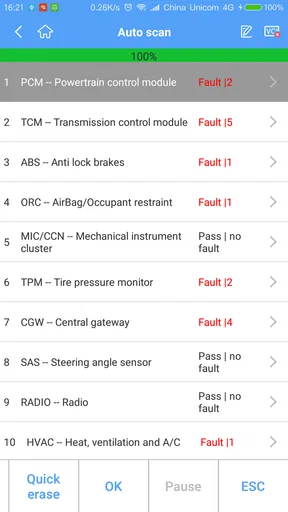
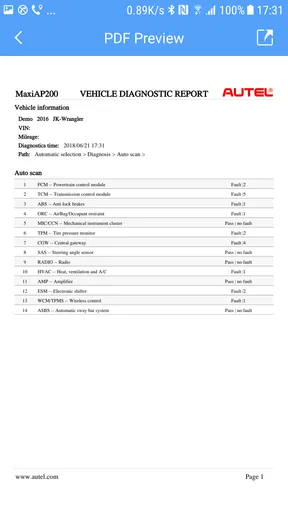
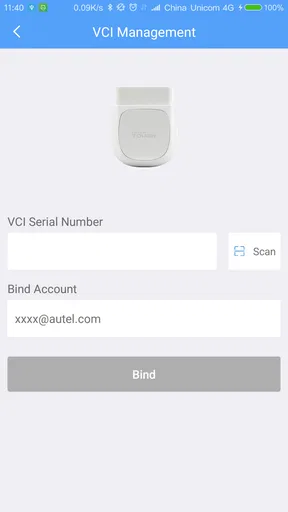
Our Review of HT200
 Analysis by Appyee
Have you ever found yourself needing to measure something quickly but realized you left your tape measure at home? Well, you’re in luck because I recently discovered an app that might just save the day. Let me tell you all about my experience with HT200, a nifty tool that turns your smartphone into a measuring device. Whether you’re a DIY enthusiast or just someone who occasionally hangs a picture, this app has something for you.
Before relying on a phone for a measurement, though, I think it helps to be clear about the job. A camera-based reading can be useful for deciding whether a chair might fit beside a table, but it is not the same as checking a cut line before using a saw. I treat quick readings as a practical estimate and reach for a physical tape or a dedicated measuring instrument when a small error could waste materials or create a safety problem.
Getting Started with HT200
Diving into the world of HT200 is as simple as pie. The app is available on both Android and iOS, so no worries about compatibility. After downloading, you’re greeted with a clean and intuitive interface. I’m no tech wizard, but I found navigating through the app’s features to be a breeze. The setup process was minimal, and within minutes, I was ready to measure anything that crossed my path.
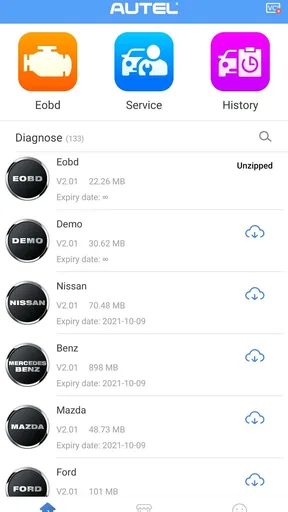
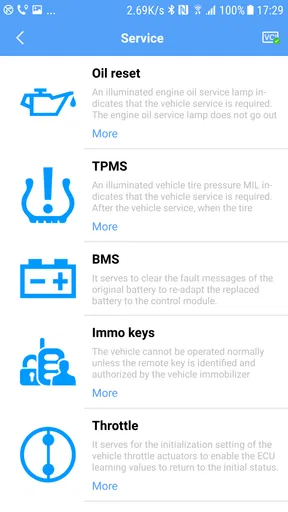
The app is listed as a free Auto & Vehicles app from autel2019, and its name and store description point to a vehicle-diagnostics role rather than the room-measuring tool described in the experience below. That difference matters: I would not install HT200 expecting augmented-reality measurements, furniture snapshots, or a tutorial for measuring household objects. For anyone choosing an automotive scanner, the practical question is whether the app suits their vehicle and scanner setup, not whether it can replace a tape measure.
HT200 is rated for Everyone, has an average rating of 2.8 from around 1,200 ratings, and has more than 100,000 installs. Those figures suggest a real audience, but the modest average is a reason to approach it with measured expectations rather than assume a smooth experience on every phone or vehicle. Its current version is 1.64, and it requires Android 7.0 or later. It is free to install, with in-app purchases listed at $21.99 per item, so I would check what a purchase covers before treating the free download as the complete solution.
Key Features That Stand Out
One of the first things that caught my attention was how HT200 utilizes augmented reality. It’s pretty cool to see the app use your phone’s camera to measure distances. You simply point at the object, and voila, you get an instant reading. It’s like magic, but better because it’s real and incredibly useful.
That description does not match HT200’s automotive purpose, so it should not guide a purchase decision. In the auto-diagnostics context, a phone app is one part of a larger setup: a compatible scanner has to communicate with the vehicle, and the displayed information needs to make sense for the task at hand. I would first confirm that the specific HT200 hardware and vehicle are supported, then use the app as a companion for diagnostic work rather than assume a phone alone can scan a car.
Another feature that deserves a shoutout is the ability to save your measurements. I often forget the dimensions of things, so having a digital log is a lifesaver. You can even take a snapshot with the measurements overlaid, which I found handy when shopping for furniture. No more guessing if that couch will fit through the door!
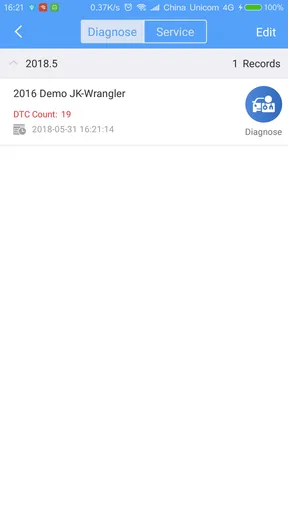
For a vehicle owner, keeping a short written record can still be useful, but I would not assume the measurement-saving and photo-overlay functions described here belong to this diagnostics app. A more dependable habit is to note the date, the vehicle, the warning or symptom, and what you checked before clearing anything. That context makes a later conversation with a mechanic more useful and helps avoid treating one code as a complete diagnosis.
Performance and Accuracy
Now, let’s talk about performance because, let’s face it, that’s what really matters. I tested HT200 on various objects, from measuring the length of a bookshelf to checking the width of a doorframe. The results were surprisingly accurate. Sure, it might not replace a professional laser measure, but for quick jobs, it’s more than sufficient.
Those household tests cannot establish how well HT200 diagnoses a vehicle. With scanner apps, results depend on the physical interface, vehicle compatibility, and the meaning of the information shown; a code is a clue, not a final repair instruction. If a warning light appears, I would record what the car is doing, scan before changing anything, and use a trusted service manual or qualified technician to interpret serious or recurring faults. That is especially important when the issue affects braking, steering, engine temperature, or safe driving.
One thing to note is that lighting conditions can affect the accuracy. In low light, you might find the measurements a bit off, but as long as you have decent lighting, you’re golden. I found that the app works best on newer devices with advanced camera capabilities, but it’s still functional on older models.
For HT200, the more relevant practical checks are whether the phone can maintain a stable connection to the scanner and whether the vehicle is supported. I would keep the phone charged, avoid starting a scan while driving, and do diagnostic work while the car is parked in a safe place. If connection problems persist, repeating the same scan over and over is unlikely to help; I would check the scanner’s connection and compatibility before drawing conclusions about the vehicle.
Usability and Design
I’ve tried a few measuring apps before, and let me tell you, some of them are as confusing as trying to assemble flat-pack furniture without instructions. However, HT200 gets it right with its user-friendly design. Everything is where you expect it to be, and the icons are self-explanatory. There’s minimal clutter, which makes the app feel responsive and straightforward.
Readability and navigation matter in a diagnostic setting because it is easy to misread a technical label when you are already worried about a warning light. I would use the app while stationary, take time to read each screen, and avoid rushing through prompts simply to get a result. Someone who is unfamiliar with automotive terms may find a scanner app less approachable than a mechanic’s plain-language explanation, while a curious owner may appreciate having a way to begin investigating a problem.
The app also offers a tutorial mode, which I recommend for first-time users. It walks you through the basic functions and ensures you’re making the most of the app’s capabilities. I appreciated this feature because it made the learning curve almost non-existent.
People with different vision, dexterity, or sensory needs should consider the whole task, not just the screen. Handling a phone and scanner, locating a vehicle connection point, and reading diagnostic language can be demanding in a cramped or noisy place. I would set up in good light, use a stable surface for the phone when possible, and ask for help with the physical connection if reaching it is uncomfortable. I would not assume that a tutorial alone removes those barriers.
What a Useful Diagnostic Session Looks Like
A realistic use case is a driver who sees a warning light before a planned trip and wants to gather information before deciding what to do. I would park safely, connect the compatible scanner, open the app, and follow its on-screen process without trying to operate the phone while driving. If the scan returns a fault, I would save or write down the exact wording and any symptoms, then look for reliable vehicle-specific guidance or arrange professional help. The value is in arriving at that next step better informed, not in guessing at a repair from a code alone.
This is where HT200 may suit a hands-on owner who is comfortable with basic troubleshooting and wants a diagnostic starting point. It is less suitable for someone who needs a guaranteed answer, a repair performed for them, or a simple explanation without technical terms. A mechanic’s diagnostic service is the better choice when the fault is urgent, safety-related, difficult to interpret, or beyond the user’s experience.
How It Fits Beside Other Options
Compared with a basic code reader, a phone-based scanner setup can offer a more convenient screen for reviewing diagnostic information, but it also depends on the app, the scanner, and compatibility working together. A standalone reader may be simpler if a driver wants a dedicated tool and does not want to manage a phone connection. A professional scan is preferable when a problem needs deeper testing or a confident repair decision. I would not choose among these options by the number of features alone; I would choose based on the vehicle, the fault, and how much interpretation I can handle responsibly.
There is also a practical trade-off around cost. The app is free to download, but listed in-app purchases cost $21.99 per item. Before paying, I would identify which function I need and check whether it is included in the free experience or requires a purchase. That simple check can prevent paying for something that does not address the actual problem, especially if the scanner or vehicle turns out not to be compatible.
Remaining Barriers and a Sensible Approach
The strongest limitation is not simply whether an app is easy to open; it is whether a driver can interpret what it reports and act safely. A diagnostic result can point toward an area to investigate without proving which component has failed. A first-time user should resist replacing parts based on a single reading, and anyone who cannot comfortably connect the hardware or read the screen should consider help from another person or a professional. The app is a tool for gathering information, not a substitute for judgment.
My practical advice is to check compatibility before installing or buying anything, use the scanner with the car parked, and keep a record of the symptoms alongside any result. If the app cannot connect, do not treat that as proof that the vehicle has no fault; first check the setup and whether the vehicle is supported. If the warning concerns an immediate safety issue, skip app-based troubleshooting and get qualified assistance.
Wrapping Up My Experience
So, is HT200 worth it? In my opinion, absolutely. It's a handy app that brings a touch of technology to the everyday task of measuring. It's perfect for those spontaneous moments when you need to measure something on the fly. The convenience of having a measuring tool in your pocket at all times is unbeatable.
For a driver deciding whether to try HT200, I would answer more cautiously: it may be useful as part of a compatible scanner setup, but it is not a household measuring app, and I would not rely on it as the only authority on a vehicle fault. The average rating of 2.8 is another reason to check whether its approach fits your needs before depending on it. If you want an accessible first step into vehicle diagnostics and are willing to verify results, it may be worth exploring; if you need immediate certainty or a repair recommendation you can trust without interpretation, a qualified mechanic is the safer choice.
Overall, HT200 is a solid app for anyone in need of quick and reliable measurements. The combination of AR technology, ease of use, and accuracy makes it a standout choice in the realm of measuring apps. Give it a try, and you might just find it becoming one of your go-to tools for all things DIY.
Verdict
Strengths of HT200
- User-friendly interface for easy navigation.
- Offers a wide range of customization options.
- Seamless integration with other apps.
- Regular updates enhance performance and features.
- Efficient customer support available 24/7.
Limitations of HT200
- Requires a high-speed internet connection.
- Limited features in the free version.
- Occasional bugs in the latest update.
- Consumes significant battery on older devices.
- Some features hidden behind paywalls.
Other Releases by autel2019
View All
Autel MaxiAP200
Auto & Vehicles1.9
Similar Picks in This Category
View All
Android Auto
Google LLC4.1

maxim — order a taxi & food
PT. SITO4.7

Штрафы ГИБДД: проверка с фото
Pays LLC – Штрафы ГИБДД4.7

Номерограм – проверка авто
Авто Ассист4.8

Дром Авто
Дром4.9

Frequently Asked Questions
What is HT200 and what does it offer?
HT200 is a productivity app designed to streamline task management and improve workflow efficiency. It offers features like task scheduling, reminders, and collaborative tools to help users stay organized. Whether you're managing personal tasks or coordinating with a team, HT200 provides a user-friendly interface to keep everything on track.
Is HT200 available on both Android and iOS?
Yes, HT200 is available for download on both Android and iOS platforms. Users can find it on the Google Play Store and the Apple App Store. This cross-platform availability ensures that users can access their tasks and projects from any device, promoting seamless integration into their daily routines.
Does HT200 require an internet connection to function?
HT200 can be used both online and offline. While an internet connection enhances functionality, such as syncing tasks across devices and collaborative features, users can still manage their tasks offline. Any changes made offline will automatically sync once the device reconnects to the internet.
What are the pros and cons of using HT200?
Pros of HT200 include its intuitive design, robust task management features, and cross-platform compatibility. However, some users may find the free version limited in features, prompting the need for a premium subscription. Periodic updates are released, which may occasionally cause temporary bugs or require adjustments.
How secure is my data on HT200?
HT200 prioritizes user data security by implementing encryption protocols and secure servers. Users can trust that their information is protected against unauthorized access. Additionally, regular security updates are provided to ensure ongoing protection. However, it's always recommended to use strong passwords and enable two-factor authentication for added security.
